


Whether you’re heading to a conference in Berlin, working remotely from a Lisbon café, or navigating a busy airport en route to London, one thing remains crucial: your devices need to stay powered. A high-speed portable USB-C charger may seem like a minor item, but it can make or break your experience. Without the right charger setup, you risk delays, lost productivity, or simply the stress of seeing your battery die when you need it most.
In this guide, we explore the 5 most common charging mistakes travellers make—and how to avoid them. Whether you’re a digital nomad, business traveller, or remote worker, you’ll find practical, real-world insights into choosing and using the right travel charging setup. You’ll also discover how to assess charging efficiency, avoid overheating risks, and navigate international plug compatibility.
Mistake 1: Assuming Any USB Port Will Charge Your Devices Efficiently
Many travellers are surprised to find that charging from aeroplane seats, hotel lamps, or public transport ports can be painfully slow. Most of these ports are limited to outdated USB-A connections delivering only 5W or less—nowhere near enough to power today’s smartphones, let alone tablets or laptops.
Use Case Scenarios:
- On a flight, seatback USB ports provide minimal current
- At hotels or event venues: limited outlets shared across multiple devices
- During work: livestreams or virtual meetings can’t pause for battery issues
Solution: Use a travel charger with dynamic power distribution to prioritise fast-charging high-demand devices first. Consider models with a real-time current display so you can verify efficient charging while on the move.
Mistake 2: Bringing the Wrong USB-C Charger
Not all USB-C chargers are created equal. Many travellers unknowingly pack chargers that either don’t support Power Delivery (PD) or don’t match their device’s wattage needs. The result: slow or incomplete charging, especially with power-hungry gear like laptops.
Quick Reference Table: USB-C Interface Types
| Interface/Protocol | Functionality | Travel Fast Charging Suitability |
| USB-C 3.0 | Data transfer, slow | ❌ |
| USB-C PD 3.0 | 18–100W fast charge | ✅ |
| USB-C PPS | Dynamic voltage control (Android) | ✅ |
| Thunderbolt 4 | High-speed + charging | ✅ (for laptops) |
Tip: If you’re carrying multiple devices (e.g., a phone, tablet, and laptop), choose a usb-c charger that supports at least 65W PD with multi-device distribution.
Mistake 3: Misunderstanding Total vs Per-Port Output
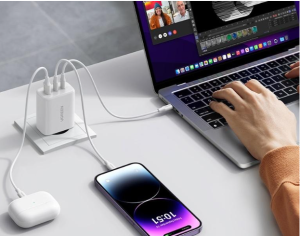
It’s easy to assume that a 65W charger can charge your phone and laptop at full speed simultaneously. But in many travel charger models, that 65W is split across all ports. For example, plugging in two devices may result in only 45W + 20W, which won’t be enough to charge your laptop properly.
Recommendation: Always read the spec sheet—specifically the “multi-port output scenario.” Ideally, choose chargers that support full-speed charging across any two ports, or ones with smart power negotiation.
Mistake 4: Ignoring Heat Management and Safety Certifications
Compact travel chargers often use GaN (gallium nitride) technology for better efficiency, but the tradeoff is higher heat concentration. A hot charger inside your bag or on a plane tray can be both uncomfortable and risky.
How to Evaluate Travel Charger Safety:
- Prefer aluminium casing or dual heat vents for extended use
- Look for protections: overcurrent, overvoltage, overtemperature, short-circuit
- Check for certifications: CE (EU), FCC (US), PSE (Japan)
These not only ensure safe use abroad but also offer peace of mind when you leave your gear charging unattended—especially in shared workspaces or hotels.
Mistake 5: Forgetting International Plug Compatibility
Travelling across borders? Don’t forget that outlets differ from country to country. Using the wrong plug can render your USB-C charger useless—or worse, damage your device.
Quick Plug Reference Rhyme:
“US-A, Japan-B, UK-G, Euro-C, Germany-F, China-I”
Suggestion: Choose a travel charger with integrated or modular plug systems. Some models come with slide-on adapters (EU, UK, US) to cover most global sockets.
Bonus: Essential Travel Charging Kit Checklist
To streamline your packing and ensure no power-related surprises, here’s a quick checklist of charging essentials for travel:
- A high-power (65W+) USB-C charger for your main device
- A multi-port travel charger (with at least 2 ports)
- Universal plug converter with EU/UK/US compatibility
- 1–2 E-marked USB-C cables (to support full PD power delivery)
- A lightweight storage pouch to organise chargers and cords
Having this kit ready reduces stress and ensures you’re always prepared for any charging scenario—whether at the airport, in a coworking café, or mid-presentation.
Conclusion
Your charging setup plays a bigger role in your travel experience than you might think. From avoiding delays to maintaining workflow and staying connected, the right travel charger and USB-C charger can empower you to work smarter and move more freely. By understanding output distribution, certification standards, and global compatibility, you’re not just packing better—you’re planning smarter.
Now that you know the pitfalls and the strategies to avoid them, your next trip won’t be powered by guesswork—it’ll be powered efficiently, reliably, and safely.
